Reading the Submittal and RFI Backlog as an Aging Histogram
The Problem
Every monthly progress meeting has a moment where someone asks how the submittals are tracking, and the honest answer is a shrug. The register in the PM platform has the numbers, but a flat list of a hundred line items doesn't tell you what's stuck — and the count you recite from memory always flatters whoever is doing the reviewing. I wanted the field-side view: log each open submittal and RFI the day it goes out, and see the aging picture as a single histogram I could put on a slide.
The Approach
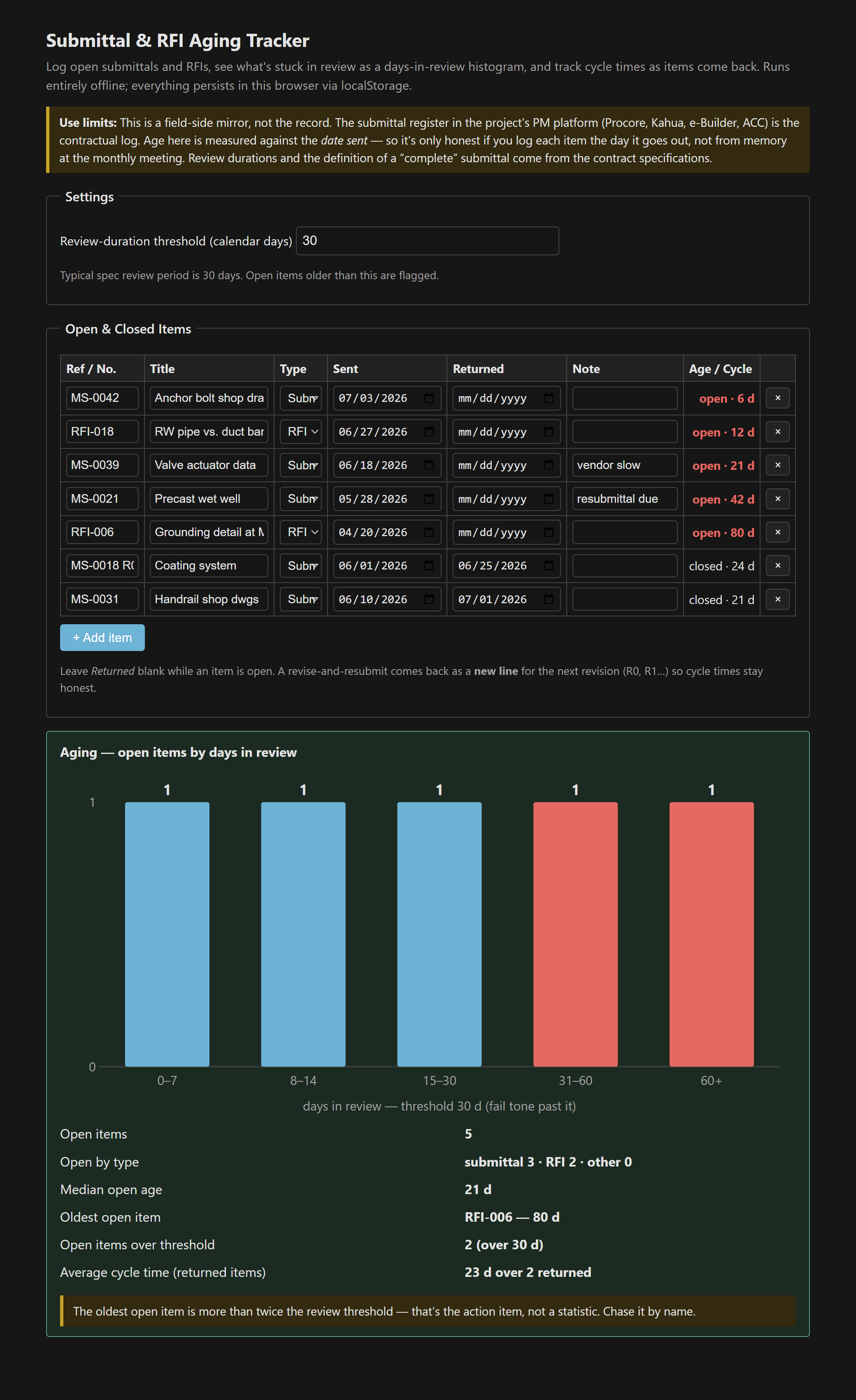
An item is open while its Returned field is blank, and its age is simply today − date sent in calendar days. The open items drop into buckets — 0–7, 8–14, 15–30, 31–60, 60+ days — and the bars past the review threshold (30 days by default, the typical spec period) draw in a fail tone so the backlog reads at a glance. Returned items leave the histogram but stay in the table with their cycle time shown, so the average review duration is measured, not guessed. Alongside the chart, a stats line calls out the median open age and, crucially, the single oldest item by name and age.
Aging from the date sent, and why R0/R1 are separate lines
Two decisions keep the numbers honest. The first is that aging is measured from the date sent, not from when you remembered to log it — the same contemporaneous-records habit the working-day and SWPPP trackers lean on [1]. A register reconstructed at month-end quietly understates every age and hides exactly the items that are actually stuck. The second is that a submittal returned “revise and resubmit” is not closed: it starts a new revision cycle. R1 goes back out as its own line the day it ships. Roll R0 and R1 into one row and the cycle time looks half as long as it really was, which is the opposite of what a cycle-time metric is for.
What the stats panel is really telling you
- The histogram shows the owner's rep where the backlog sits without naming names — useful in a room where the naming is political.
- The oldest-item stat is the sentence that follows: “the oldest open submittal is 80 days, here's what it's holding.”
- Not every old item is the reviewer's fault. Some sit open because the resubmittal is on your side of the fence. The tool shows the age; the cause is the conversation.
- When every open item is over threshold, that's a review-capacity problem, not a handful of stragglers — a different escalation entirely.
The submittal register in Procore, Kahua, e-Builder, or ACC is still the contractual log [2] — this is a field-side mirror that exists so you notice the backlog the week it forms instead of at closeout. Single file, vanilla JS, everything persisted in localStorage and nothing leaving the browser.
The tool: Submittal & RFI Aging Tracker.
References
- [1] Contract specifications — submittal procedures and review durations (Division 01, typically Section 01 33 00). Governing document.
- [2] The project's PM platform of record (Procore / Kahua / e-Builder / Autodesk Build) — the contractual submittal and RFI register.