A Look-Ahead Gantt That Deliberately Has No Dependency Logic
The Problem
The two-week look-ahead is the most useful planning artifact on a jobsite and the one most often built wrong. Hand a foreman a fragment of the P6 schedule with logic ties and float and it becomes an argument about the master schedule; hand them a blank grid and they'll fill it with what they actually intend to do next week. I wanted a Gantt that draws the second thing — tasks as bars across a short date axis — and pointedly refuses to be the first.
The Approach
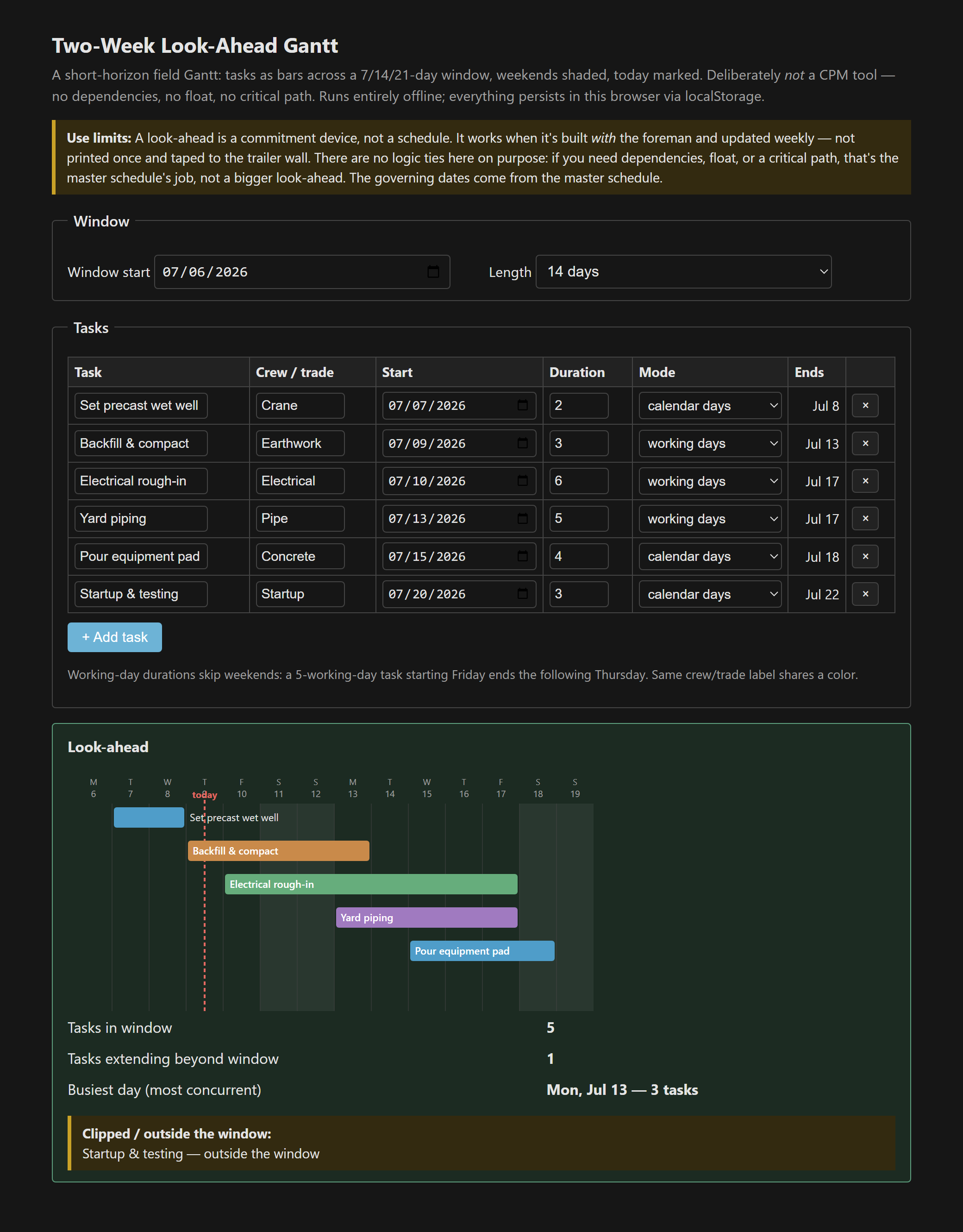
You set a window start and a length (7, 14, or 21 days) and add tasks: a name, an optional crew label, a start date, a duration, and a toggle for whether that duration is calendar or working days. The chart shades weekend columns, drops a line on today, and draws one bar per task, colored by crew. Tasks that run past the window get a clipped bar and a line in a flag list; a small stats panel reports how many tasks fall in the window and which day is busiest. That's the whole tool. There is no field for a predecessor, because there is no predecessor.
Working-day durations, computed the way a foreman means them
The one bit of arithmetic worth getting right is the working-day mode. A five-working-day task starting on a Friday does not end four days later on Tuesday — it spans Friday, then Monday through Thursday, and ends the following Thursday, six calendar days out. The tool walks the calendar counting only weekdays until it has counted the duration, and draws the bar as one continuous block so the shaded weekend shows the skip underneath it. Dates are parsed as local values, split from the YYYY-MM-DD string, so the axis never drifts a day across a timezone boundary [2].
Why no dependencies is a feature, not an omission
- A look-ahead is a commitment device. It works when it's built with the foreman and updated weekly — not printed once and taped to the trailer wall.
- Its real job is make-ready: surfacing constraints — material, access, information, manpower — early enough to clear them before the work is due [1].
- Anything still on the look-ahead three weeks running is a constraint problem, not a scheduling problem. Bumping it another week doesn't make it ready.
- If moving one bar should move another, you're describing logic ties, and those belong in the master schedule where float and the critical path actually live — not in a bigger look-ahead.
The master schedule is still the governing document for dates and sequence [2]. This is the near-term commitment view that sits in front of it. Single file, vanilla JS, everything persisted in localStorage and nothing leaving the browser.
The tool: Two-Week Look-Ahead Gantt.
References
- [1] Ballard, G. (2000). The Last Planner System of Production Control — look-ahead planning and make-ready (lean construction).
- [2] The project master schedule (Primavera P6, MS Project, or equivalent) — the governing document for dates, durations, logic, and float.